
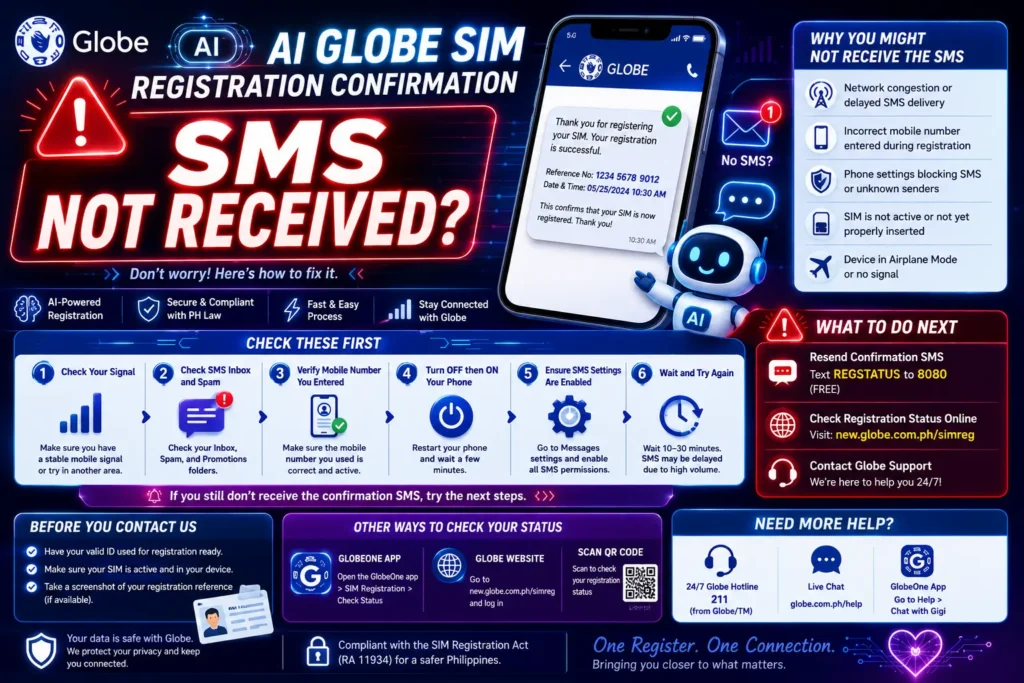
AI Globe SIM Registration Confirmation SMS Not Received?
Waiting for your confirmation SMS after registering your AI Globe SIM, but it hasn’t arrived yet? That’s frustrating — but don’t worry. You’re not the only one, and this problem is usually easy to fix. Below are the most practical steps that help 9 out of 10 people solve it quickly.
What Does the Confirmation SMS Do?
When you register your Globe SIM, the system sends a confirmation SMS to:
If that message doesn’t arrive, the registration won’t go through — so it’s important to fix it fast.
Common Reasons You Didn’t Get the SMS
Here are the most typical causes:
Weak or No Network Signal
If your phone shows low bars or no signal, messages may not come through right away.
Tip: Move to an open space or near a window to boost the signal.
Wrong Phone Number or Country Code
It happens more often than you think — especially if you’re in another country or mistyped a digit.
Tip: Before resending, double‑check your number carefully.
SMS Filtering by Your Phone or Apps
Some phones block automated messages or filter them into Spam folders.
Tip: Check your message app’s Spam or Blocked sections.
Message Centre or Carrier Glitch
Occasionally, your carrier’s message routing gets slowed down or temporarily blocked.
Tip: Wait a few minutes and try again — sometimes a short delay fixes it.
Too Many SMS Requests at Once
If you hit “Resend” too quickly, the system may restrict new messages for a short time.
Tip: Wait 1–2 minutes before requesting again.
Step‑by‑Step Solutions You Can Try Now
Step 1 — Check Your Signal Strength
If your signal bars are low:
Move to a better location
Turn Aeroplane Mode ON for 10–20 seconds
Turn Aeroplane Mode OFF
This refreshes the network connection and often brings in blocked messages.
Step 2 — Verify Your Phone Number
Make sure:
The country code is correct
All digits are correct
You didn’t accidentally add or delete a number
An extra digit here or there can send the SMS somewhere else.
Step 3 — Clear Message App Filters
Go into your SMS app and:
Turn off spam filters
Check the Blocked/Spam folders
Allow messages from unknown senders
Some phones automatically block SMS from short codes.
Restart Your Phone
This simple step resets many network settings. You’d be surprised how often this helps.
Try Another Phone (If Available)
Put your SIM into another phone and try resending the confirmation. This isolates phone‑specific issues.
Wait a Little, Then Retry
Sometimes servers are slow due to high demand. Waiting 10–15 minutes before trying again helps.
When to Contact Support
If you’ve tried all the steps above and still haven’t received the confirmation:
Contact AI Globe support — they can check your registration status and guide you.
Make sure to have:
Tips to Prevent Problems in Future Registrations
Here are easy habits that reduce SMS issues:
Register in a place with good mobile coverage
Avoid hitting “Resend” repeatedly
Keep your SMS inbox clean
Disable spam filters when expecting important messages
Turn Wi‑Fi off if it interferes with the mobile connection
FAQs
Final Words
Getting stuck without your confirmation SMS is annoying, but a few simple checks usually fix it. Most times, the problem is a temporary network or phone setting issue.
If you’re still stuck after trying everything, contacting support is the best next step — they can check the registration on their end.


