
Globe SIM Registration Selfie Rejected? Common Reasons
If your Globe SIM registration selfie got rejected, you might be wondering what went wrong — and how to fix it fast. This happens to many people during the verification process, but most of the time it’s because of easy‑to‑fix issues.
In this article, we explain why selfies are rejected, what you can do to avoid them, and how to complete your SIM registration.
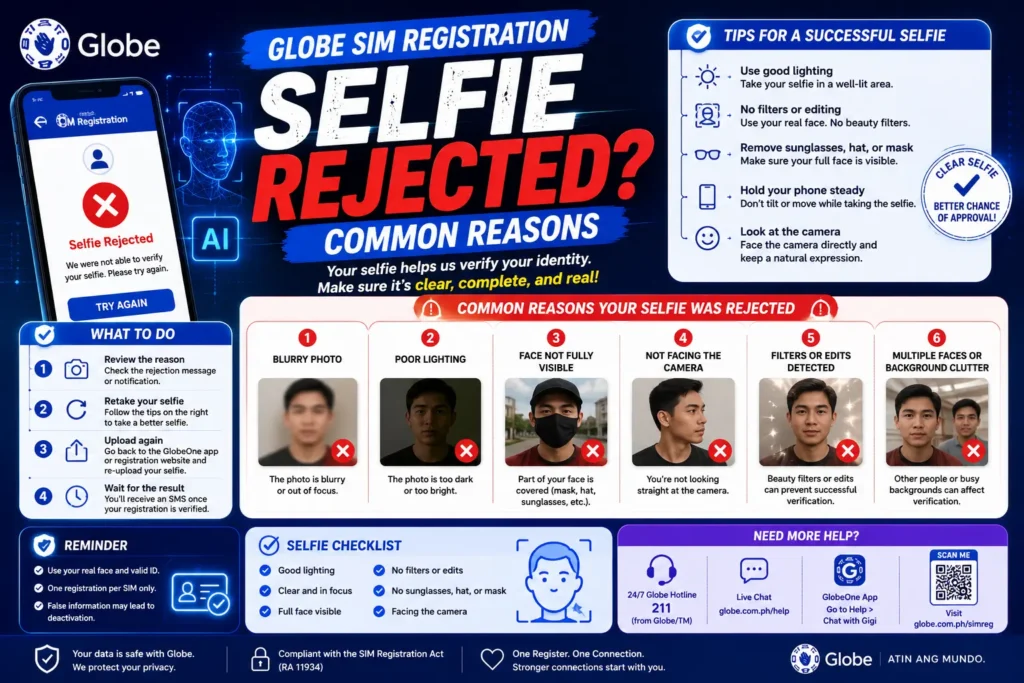
Why Globe Requires a Selfie in SIM Registration
During SIM registration, Globe asks for a selfie to:
A clear and valid selfie speeds up approval — but the system needs the right quality and format.
Top Reasons Your Selfie Was Rejected
Here are the most common causes:
Poor Lighting or Blurry Photo
If the lighting is too dark or the picture is shaky, the system can’t see your features clearly.
Tip: Move to a well‑lit area — natural daylight works best.
Covering Your Face
Things like hats, sunglasses, masks, or hair covering your face can lead to rejection.
Tip: Remove anything that blocks your eyes or face.
Wrong Angle or Distance
The system expects a straight‑on face photo. A selfie that’s tilted too far or taken from too far away might be rejected.
Tip: Hold the phone straight at eye level.
You’re Too Far or Too Close
If your face fills the whole screen or is too tiny, it won’t match the expected frame.
Tip: Your face should be centered and take up about 60–80% of the frame.
Low‑Quality Camera or Blurry Upload
Old cameras or shaky shots often produce low‑quality images.
Tip: Clean your camera lens before taking the selfie.
ID Doesn’t Match Your Face Photo
If your selfie doesn’t closely resemble your ID photo, the verification can fail.
Tip: Take a natural, neutral‑expression photo, just like your ID image.
Light Background and No Shadows
A busy or cluttered background could confuse the system.
Tip: Stand against a plain, light background — a wall works great.
Step‑by‑Step: How to Take an Acceptable Selfie
Here’s an easy checklist before you snap your photo:
Good Lighting: Face a window if indoors. Avoid backlight.
Clean Lens: Wipe your camera lens for clarity.
Hold Steady: Use both hands or prop your elbow for stability.
Neutral Expression: No big smiles or weird angles.
Center Your Face: Keep it in the middle of the frame.
Remove Accessories: No glasses, hats, or masks.
Following this checklist makes approvals much more likely. You can also read: AI Globe SIM Registration Confirmation SMS Not Received?
Tips to Avoid Rejection Next Time
Don’t Use Filters: Filters distort your natural look and may cause mismatches.
Take Multiple Shots: Save a few good selfies and pick the clearest one.
Avoid Shadows: Position light in front of you, not behind.
Upload Fast: Some platforms time out if you delay.
What to Do If Your Selfie Still Gets Rejected
If you keep getting rejections even after trying better selfies:
Wait & Retry After a Few Minutes
Sometimes systems temporarily block repeated attempts.
Try Another Device
Another phone with a better camera might work.
Contact Globe Support
Reach out to Globe’s help desk or customer service — they can assist with manual review.
FAQs
Final Words
Selfie rejection during Globe SIM registration is common — but most rejections happen because of reasons that are easy to fix: lighting, angle, clarity, or background. With the simple tips above, you should be able to get your selfie accepted and complete your registration quickly.


