
Globe SIM Registration Without Return Ticket: Tourist Guide
If you’re a tourist visiting the Philippines and need a Globe SIM, you might wonder whether a return ticket is required for registration. The good news: you can register and use a Globe SIM even without a return ticket. This guide explains how, what documents you need, and tips for a smooth process.
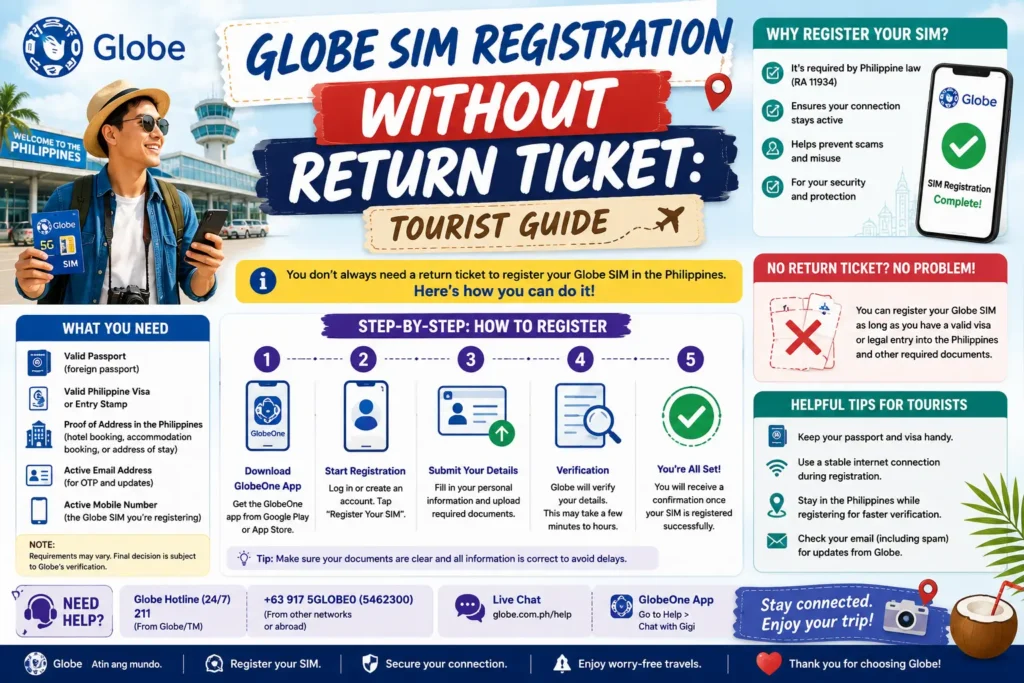
Why SIM Registration Is Required in the Philippines
All SIM cards, including those for tourists, must be registered under the SIM Registration Act. Registration ensures:
Both physical SIMs and eSIMs require registration before activation.
Do You Need a Return Ticket to Register?
No. For tourists with temporary visits, a valid passport is usually sufficient. While some stores may ask for additional proof of stay, most prepaid SIMs and traveler eSIMs do not require a return ticket.
Tips:
Documents Needed to Register a Globe SIM as a Tourist
Valid Passport – the main ID for verification
Tourist Visa – optional; only required for longer stays
Globe SIM or eSIM-ready device – purchased in-store or online
GlobeOne App – optional for eSIM registration and account management
Step-by-Step Registration Process Without a Return Ticket
In-Store Registration
Visit any Globe store in major cities or at airports.
Present your passport (and tourist visa if required).
Request a new prepaid SIM or prepaid traveler eSIM.
Fill out the registration form with your details.
For the address, you can leave it blank or use your hotel/accommodation.
Staff will verify your ID and activate the SIM.
Start using your SIM immediately.
Tips:
Online eSIM Registration
For tourists with eSIM-capable devices, online registration is possible:
Download the GlobeOne app.
Select Buy Prepaid eSIM / Traveler eSIM.
Enter personal details exactly as shown on your passport.
Upload a passport photo and a selfie for verification.
Pay for the eSIM plan via credit or debit card.
Scan the QR code on your device to activate the eSIM.
Tips:
Troubleshooting Common Issues
| Problem | Solution |
|---|---|
| Passport not accepted | Make sure it’s valid, and the scan/photo is clear; bring the original if in-store registration is done |
| eSIM QR code won’t scan | Use proper lighting, hold the camera steady, or try another device |
| SIM not connecting | Toggle airplane mode, restart phone, or select the SIM/eSIM line manually |
| OTP not received | Make sure it’s valid, and the scan/photo is clear; bring the original if in-store registration is done |
FAQs
Final Words
Bring your passport — it’s your primary ID for registration.
Use the GlobeOne app to manage your SIM, check balances, and top up credits.
Consider eSIMs for convenience and faster activation.
Purchase traveler SIM packages for data and calls suited to your short-term visit.
With these steps, registering a Globe SIM as a tourist without a return ticket is easy and hassle-free, allowing you to stay connected throughout your stay.


