
Ultimate Guide: How to Check Your Globe Balance in 2026
If you rely on your Globe SIM for communication, data, or Wi-Fi services, Ultimate Guide: How to Check Your Globe Balance in 2026. From prepaid mobile data to Wi-Fi top-ups, being able to monitor your usage ensures that you won’t run out of data or load unexpectedly, especially during critical times. Fortunately, Globe Telecom provides various ways to check your balance quickly and conveniently, whether you’re using USSD codes, SMS, or the GlobeOne app.
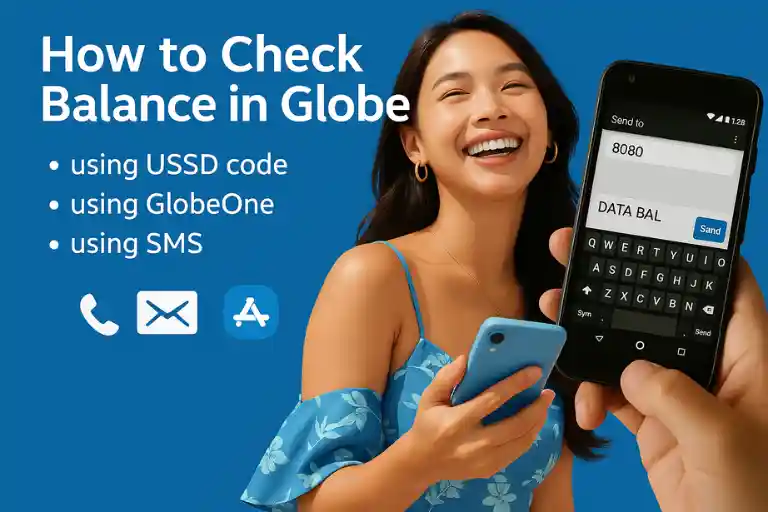
In this article, we will walk you through every method available for Globe balance inquiry. We’ll also share tips to ensure you manage your balance efficiently and avoid unexpected charges.
Checking Globe Balance Using USSD Code
The USSD code method is one of the quickest ways to check your balance without needing an internet connection. It works on all devices, whether you’re using a basic mobile phone, a feature phone, or a smartphone. Here’s how to use it:
Steps to Check Load Balance via USSD Code:
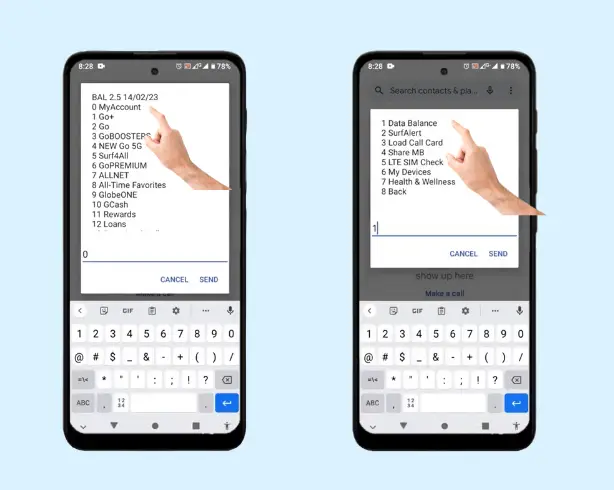
This method is free of charge and doesn’t require mobile data. It’s ideal when you’re on the go and want to quickly check your remaining balance. It’s particularly useful for those using keypad phones without internet access.
Checking Data Balance via USSD Code:
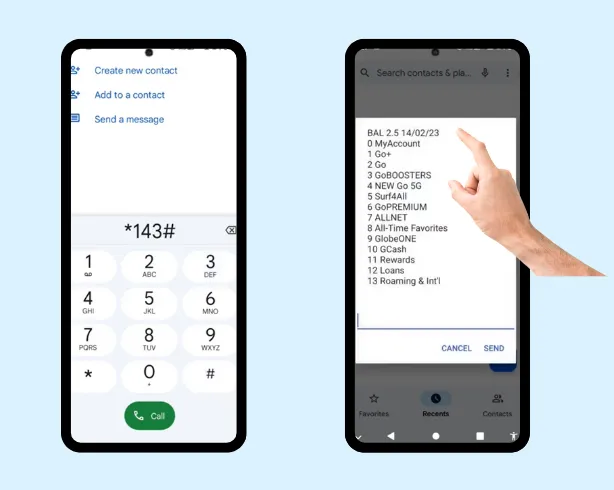
In a few moments, you’ll receive a text message detailing your remaining data allowance (in MBs or GBs), along with any expiry dates for your active data plans.
Checking Globe Balance via SMS (Text to 8080)
For users who prefer using text messages instead of apps or codes, sending an SMS to 8080 is a simple and effective method to check your Globe balance. This method is especially helpful if you’re in a location with a poor signal or have limited data access.
How to Check Load Balance via SMS:
How to Check Data Balance via SMS:
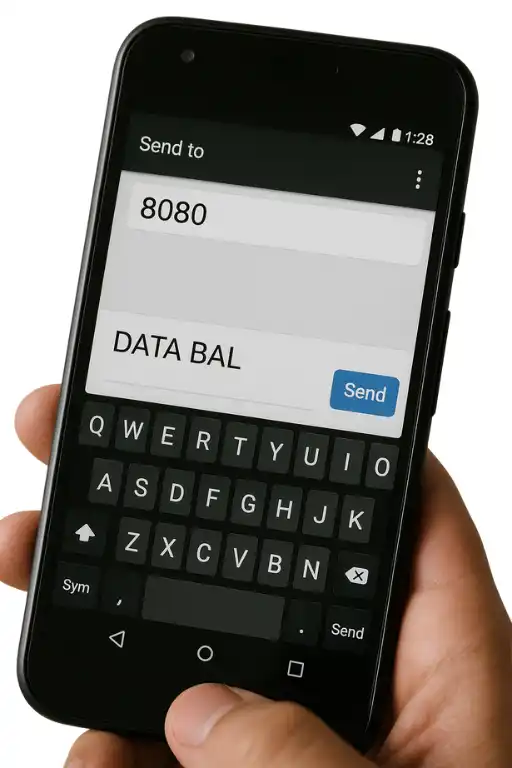
This SMS-based method is also ideal for those without smartphones or internet access and works well for people on the move or in areas with weak signals.
Using the GlobeOne App: Comprehensive Balance Management
If you’re using a smartphone, the GlobeOne app is one of the best ways to check your balance. It offers a comprehensive view of your account, including data usage, load balance, and active promos. It is more detailed than the USSD or SMS methods and provides added features for managing your Globe services.
How to Check Your Balance Using the GlobeOne App:
The GlobeOne app allows you to do much more than just check your balance. You can also:
Benefits of Using the GlobeOne App:
Globe Balance Inquiry via GCash and GOMO Apps
For those who use GCash or GOMO services, you can easily check your Globe balance via these apps as well.
How to Check Balance via GCash:
How to Check Balance via the GOMO App:
GOMO is a digital-only SIM under Globe. If you’re a GOMO user, you can use the GOMO app to check your data balance. Here’s how:
This is an easy way for users of GOMO SIMs to check their balance without needing to use the GlobeOne app.
Check Balance via Globe’s Hotline (222 or 211)
For more detailed inquiries about your balance, including postpaid details, you can call Globe’s customer service hotline. Here’s how:
Although calling the hotline is slower than using other methods, it can be useful for more detailed inquiries, especially for postpaid or roaming users.
Tips for Efficiently Managing Your Globe Balance
Regularly checking your Globe balance is crucial for avoiding unexpected data charges or running out of load during crucial moments. Here are some tips for effectively managing your Globe balance:
If you regularly use the GlobeOne app, enable push notifications to alert you when your balance is running low or when your promo is about to expire. This proactive approach helps you avoid interruptions in service.
Before registering for a new data promo, ensure that your remaining data won’t expire before the new plan kicks in. This avoids wasting any unused data and helps you manage your mobile data budget better.
If you’re using mobile data for work or entertainment, it’s a good idea to track your data consumption regularly. Apps like GlobeOne allow you to monitor usage and check how much data you have left, helping you avoid unexpected charges.
If you’re running low on mobile data or load, make use of WiFi whenever possible. Globe provides options like Globe at Home WiFi for home users. Using WiFi can save your mobile data for when you truly need it.
Check Globe’s official social media accounts or the GlobeOne app for updates on new promos, discounts, or data bundles. This way, you can take advantage of the best offers and avoid overpaying for data or load.
Most Effective Ways to Check Your Globe Balance
When it comes to checking your Globe SIM balance or data usage, there are several methods, each with its advantages depending on your device and preferences. Here’s a quick guide to help you choose the most effective option for your needs:
| Method | Applicable Devices | Internet Requirement | Best for |
|---|---|---|---|
| USSD Code Method | Keypad phones, Android, iPhones | No | Quick, simple balance checks without the need for an internet connection or an app. Ideal for users with limited data or those who need a fast check. |
| SMS/Text Method | Keypad phones, Android, iPhones | No | Simple text message for checking balances. Perfect for users who prefer basic services without internet access. |
| GlobeOne App Method | Smartphones (Android and iOS) | Yes, a working internet connection | Provides a detailed view of your balance, data usage, active promos, and history. Ideal for users who want to manage their accounts comprehensively. |
Troubleshooting Tips for GlobeOne App Issues
If you encounter issues with the GlobeOne app not displaying your balance properly, follow these steps to resolve the problem:
Check Your Internet Connection
Ensure that your internet connection is active and fast enough. To confirm, try loading a video on YouTube or browsing the web. If the connection is slow, consider moving to an area with better signal strength.
Close and Reopen the GlobeOne App
If the app seems unresponsive or crashes, try closing it completely and then reopening it. Sometimes, restarting the app can resolve minor issues and refresh the balance display.
Update the App and Log In Again
If you are experiencing issues where the app fails to load your balance, check if the app is up to date. You can go to the Google Play Store or Apple App Store and look for an update. After updating, log out of the app and log back in to refresh your account.
Clear App Cache
If the app is still not displaying your balance correctly, clearing the cache might solve the problem. Here’s how to do it on Android:
Go to your phone’s Settings.
Select Apps and find the GlobeOne app.
Tap on Storage and then choose Clear Cache.
Restart your phone and check if the balance is displayed correctly.
By following these troubleshooting steps, you should be able to resolve any issues with the GlobeOne app and regain access to your balance details.
FAQs
Conclusion
With so many ways to check your Globe balance, from USSD codes to SMS, the GlobeOne app, and more, managing your load, data, and WiFi balance has never been easier. Whether you prefer a quick code, a text message, or the convenience of an app, Globe provides multiple options that fit your needs.
By regularly checking your balance, you can stay in control of your usage and avoid surprises. Follow our guide to ensure you never run out of load or data unexpectedly and make the most of your Globe services.


