
Apply Offline and Sync Globe SIM Later – Step-by-Step Guide
When you’re trying to register or apply for Globe SIM services, there might be situations where you cannot complete the process online due to network issues, lack of internet access, or time constraints. In such cases, offline applications or registration can be a good option. Thankfully, Globe Telecom provides the flexibility to apply offline and sync your Globe SIM later when you have a stable connection.
In this article, we’ll walk you through the process of applying offline and syncing your Globe SIM later. We’ll also explain the importance of syncing and how to ensure that your information is registered correctly when you’re ready to complete the process.
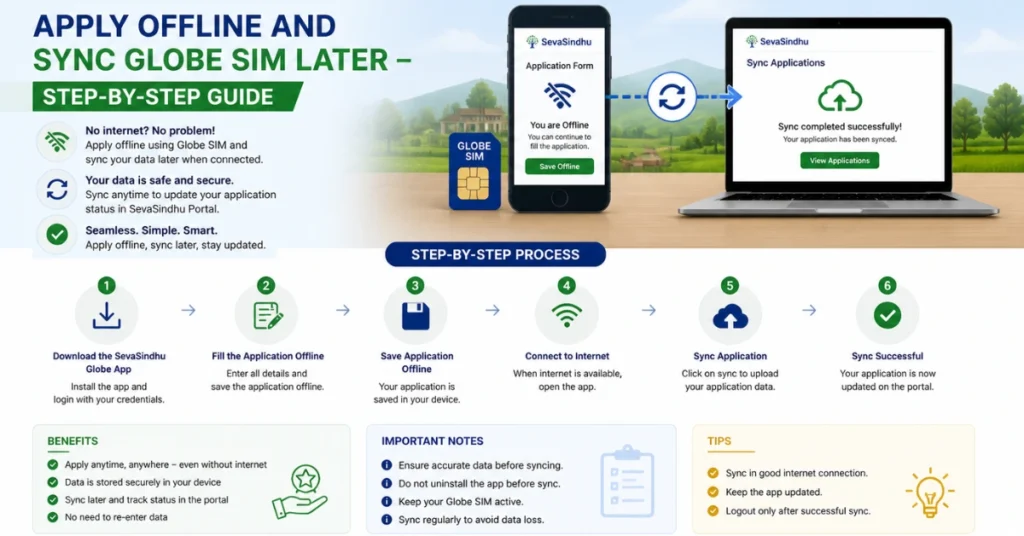
Why Apply Offline and Sync Globe SIM Later?
There are several situations where you might prefer or need to apply offline and sync your Globe SIM later:
Network issues: If you’re in an area with poor internet connectivity or experiencing network problems, applying offline allows you to complete the registration process without an active connection.
Lack of time: If you’re busy and cannot complete the full registration in one go, applying offline lets you save your progress and finish it when you have more time.
Temporary access issues: In case you’re unable to access the Globe website or GlobeOne app, offline applications ensure that your request is not lost.
Offline applications ensure that your details are still captured, and you can complete the final syncing step when it’s convenient.
How to Apply Offline and Sync Globe SIM Later
Follow these step-by-step instructions to apply offline for Globe SIM services and sync later.
Visit a Globe Store or Kiosk
If you’re unable to complete the application process online, you can visit a Globe Store or Globe Kiosk to apply offline. Here’s how:
Locate a Globe Store or Kiosk: Use the Globe Store locator on their website to find the nearest store or kiosk.
Provide Required Documents: Bring the necessary documents for SIM registration or service activation. This typically includes:
A valid government-issued ID (e.g., driver’s license, passport, etc.).
Your Globe SIM number or account details, if applicable.
Fill Out the Registration Form: At the store or kiosk, a Globe representative will provide you with a registration form. Fill out the form with accurate details, such as:
Your full name.
Address.
Date of birth.
Mobile number.
Submit the Form and Documents: After filling out the form, submit it along with your documents to the Globe representative.
Offline Application Confirmation: The representative will confirm that your application has been processed offline and that your details will be synced to the Globe system later.
Tip: If you’re visiting a Globe Kiosk, the process might be more automated. Follow the instructions on the kiosk and provide the necessary documents when prompted.
Apply Offline Using GlobeOne App (Without Internet)
If you don’t have an active internet connection but have the GlobeOne app installed, you can begin the offline application process and sync it once you have access to the internet. Here’s how:
Open the GlobeOne App: Open the app on your phone, even if you don’t have internet access.
Enter the Required Information: Fill in your personal details, such as your name, address, email, and mobile number. Even though you can’t complete the process fully offline, entering the details will save your progress for syncing later.
Save Application: After entering your details, the app will allow you to save your application as a draft, meaning the information you’ve entered is stored locally on your device.
Wait for Internet Access: Once you have access to a stable internet connection, open the GlobeOne app again.
Sync Your Application: The app will automatically sync your offline application to the Globe servers, completing the process and registering your Globe SIM or activating your desired services.
Tip: Make sure to update the GlobeOne app to the latest version to ensure smooth syncing once you’re back online.
Apply Offline by Calling Globe Customer Support
If you cannot visit a Globe store or use the GlobeOne app, you can also initiate your SIM registration or service application by calling Globe customer support.
Here’s how:
Call Globe Customer Support: Dial 211 (from a Globe number) or (02) 7730-1000 (from another number).
Request Offline Application: Ask the customer service representative to process your application offline and to sync your information later.
Provide Your Details: Be prepared to provide the required personal details over the phone, such as your full name, contact information, SIM number, and any other necessary information.
Confirm Syncing Later: The representative will confirm that your offline application will be processed once you have internet access, and your Globe services will be activated.
Sync Your Globe SIM Later
Once you’ve applied offline (whether at a Globe Store, through the GlobeOne app, or via customer support), you can complete the syncing step later when you have internet access.
Log in to the GlobeOne app: If you’ve used the app for the offline process, open the app again when you have access to the internet. Your details will automatically sync with Globe’s system.
Visit a Globe Store or Kiosk: If you applied offline at a Globe Store or Kiosk, visit the store again when you have internet access to complete the registration and finalize the syncing process.
Online Application Completion: If you initiated your application over the phone, Globe customer support will confirm when the sync is complete and your registration is processed.
Tip: If you’ve made any updates or changes while applying offline, always double-check your details when syncing to ensure everything is accurate. You can also read: What Documents to Bring for Assisted SIM Registration 2026
FAQs
Final Words
The ability to apply offline and sync later for Globe SIM services is a convenient option for people experiencing network issues or time constraints. By following the steps outlined above, you can easily start the application process and complete it when you’re ready.
If you encounter any issues during the process, don’t hesitate to reach out to Globe customer support for assistance. They’re there to ensure you get your SIM registration or service application completed smoothly.


