
How to Report a Lost Globe SIM Device: Step-by-Step Guide
Losing your Globe SIM device can be a stressful experience, especially when it’s tied to your personal information, contacts, and services. Fortunately, Globe Telecom offers straightforward ways to report a lost SIM device and secure your account. Whether it’s your phone or your Globe SIM card that’s gone missing, it’s important to act quickly to avoid any potential misuse.
In this article, we’ll guide you through the steps to report a lost Globe SIM device, as well as the necessary actions to protect your account and personal data. We’ll also cover how to request a replacement SIM and ensure your services are secure.
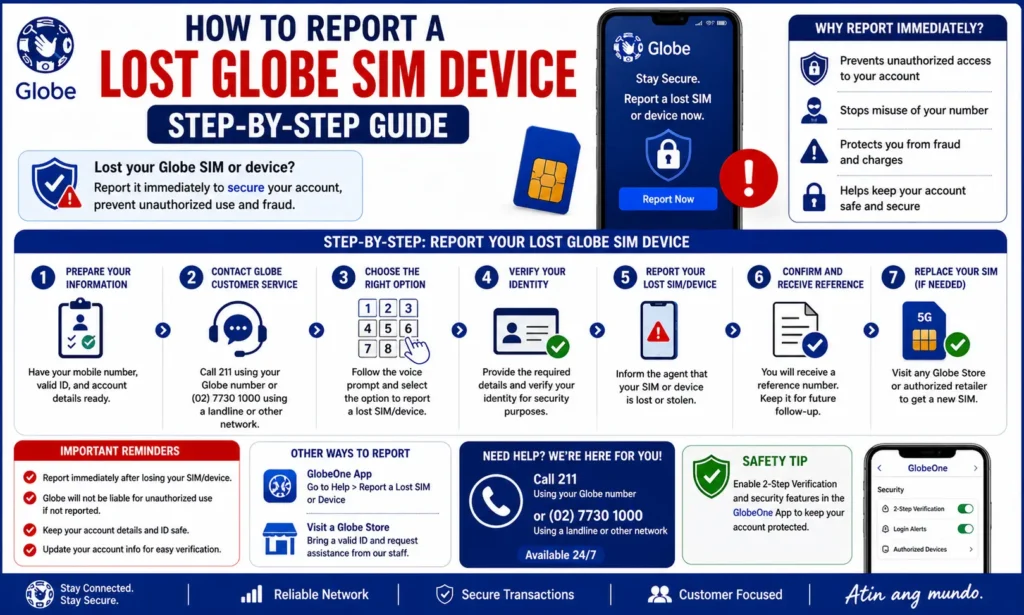
Why You Should Report a Lost Globe SIM Device Immediately
When you lose your Globe SIM device, there are several risks, including:
Unauthorized use of your phone number or account.
Security concerns regarding your personal information and contacts.
Unwanted charges for calls, messages, or data usage by someone else.
Reporting the loss promptly ensures that:
How to Report a Lost Globe SIM Device: Step-by-Step
If you’ve lost your Globe SIM device, follow these steps to report it and secure your account.
Call Globe Customer Support
The quickest way to report your lost Globe SIM device is by calling Globe’s customer support. They will be able to lock your SIM and prevent unauthorized access.
Here’s how you can contact them:
Globe Hotline: Dial 211 from your Globe number or (02) 7730-1000 if you’re calling from another network or landline.
Globe Support Number: If you’re calling from abroad, you can reach out to +63 917 801 0777.
When you call, make sure to:
Report the Lost Device or SIM Card
Once you’re connected to customer support, explain that you’ve lost your Globe SIM device or SIM card and would like to report it. The Globe customer representative will:
Suspend your services to prevent misuse of your SIM card.
Deactivate the SIM card, making it impossible for anyone to use your mobile number for calls, texts, or data usage.
The representative may ask for the following details:
Request a Replacement SIM
If your SIM card is lost, you will need a replacement SIM to continue using Globe services. After reporting the loss, the customer service representative will guide you on how to request a replacement SIM card.
Here’s how to request a replacement SIM:
Visit a Globe store: Go to your nearest Globe Store or Globe Kiosk to request a new SIM. You’ll need to bring a valid ID (e.g., driver’s license, passport, or government-issued ID) for verification.
Online Replacement: You can also request a replacement SIM online through the Globe website or the GlobeOne app. If you opt for this method, the new SIM will be delivered to your address.
SIM Replacement Fee: There might be a small fee for the new SIM card, depending on your account and location.
After receiving your new SIM card, you will need to activate it and reconnect your Globe services. You can also read: Prevent OTP Delays During Globe SIM e-KYC – Simple Fixes
Lock or Erase Your Lost Device (If Applicable)
If your SIM device (phone) is also lost or stolen, you may want to consider locking or erasing your device to protect your data. Here are some methods for remote device locking or data wiping:
For Android Devices:
Go to the Find My Device website (https://www.google.com/android/find) or use the Find My Device app if you’ve enabled this feature.
Log in with your Google account (the one linked to your lost device).
Select the lost device from the list of linked devices.
You can either:
Lock the device remotely.
Erase all data to prevent access to sensitive information.
For iPhones (Apple Devices):
Open Find My iPhone (through the iCloud website or app).
Sign in with your Apple ID.
Select the lost device from the list.
You can choose to:
Activate Lost Mode to lock the device and display a message (like “Contact me if found”).
Erase the device remotely to delete all your data.
Monitor Your Account for Suspicious Activity
After you’ve reported your lost SIM device and requested a replacement, it’s a good idea to monitor your account for any suspicious activity. Here’s what to do:
Check your recent usage in the GlobeOne app or Seva Sindhu portal to see if any unauthorized activity (calls, texts, data) took place.
Contact Globe support if you notice any unusual charges or activity that you did not authorize.
How to Prevent Future Loss of Your Globe SIM Device
While losing your device can happen, there are steps you can take to prevent it in the future:
Set a strong lock screen on your device to prevent unauthorized access.
Use Find My Device or iCloud to track your phone if it goes missing.
Enable two-factor authentication for your accounts to provide extra security.
Always carry your SIM card and phone securely to avoid theft or loss.
FAQs
Final Words
Losing your Globe SIM device can be worrying, but by reporting it quickly, you can secure your account and prevent unauthorized access. Follow the steps outlined in this guide to report the loss, lock or erase your device, and request a replacement SIM.
Make sure to keep your account information and SIM card details secure in the future, and take advantage of the security features available on your device to minimize the risk of loss or theft. If you continue to face issues, don’t hesitate to reach out to Globe customer support for further assistance.


