
Prevent OTP Delays During Globe SIM e-KYC – Simple Fixes
The Globe SIM e-KYC process is an essential step for verifying your SIM card and ensuring your personal details are securely registered with Globe Telecom. However, one of the most common issues many users face during the e-KYC process is the delay in receiving the One-Time Password (OTP). Without the OTP, completing the process becomes difficult, leaving you stuck and frustrated.
In this article, we’ll explain why OTP delays happen during Globe SIM e-KYC, and provide you with simple and effective ways to prevent them. Whether you’re trying to register a new SIM, link your number to a service, or update personal details, these tips will help you complete the process smoothly
What is OTP in Globe SIM e-KYC?
An OTP (One-Time Password) is a temporary code sent to your registered mobile number or email address to verify your identity during online transactions or registration processes. In the context of Globe SIM e-KYC, an OTP is required to authenticate your identity and proceed with registration or verification.
The Globe SIM e-KYC process is a key part of ensuring that the details linked to your SIM card are accurate and secure. Once you enter the OTP, you can complete the registration or update your personal information.
However, when OTPs are delayed, it can create a bottleneck in the registration process. Here’s what might be causing it, and how you can fix it.
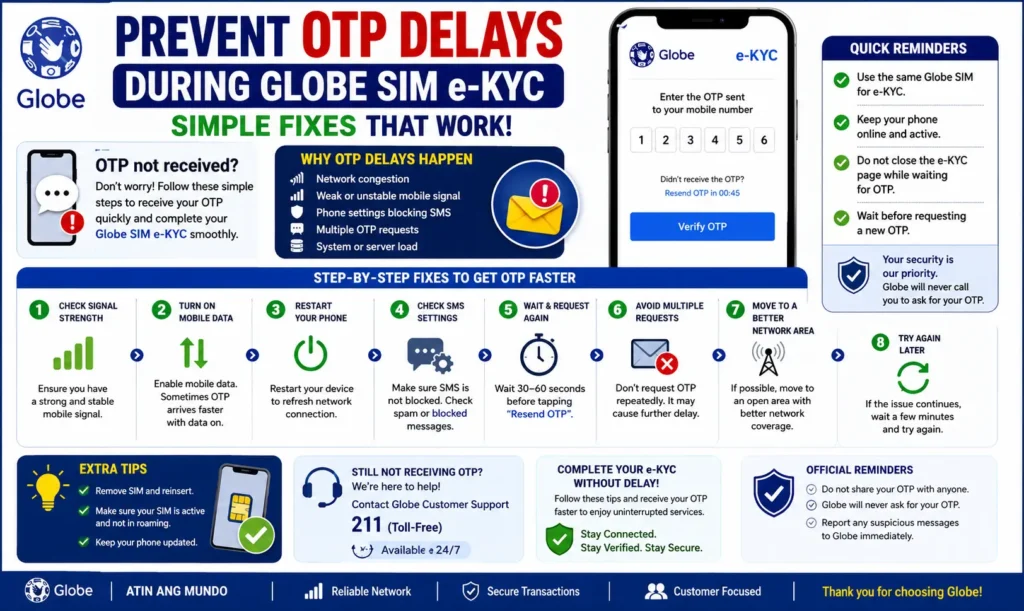
Why Do OTPs Get Delayed During Globe SIM e-KYC?
There are several reasons why OTP delays can happen when completing the Globe SIM e-KYC process:
Network Issues
A poor network connection is one of the most common reasons for OTP delays. If your mobile network is weak or unstable, it may take longer for the OTP to be delivered to your phone.
High Traffic on Globe Servers
When many people are trying to complete SIM registration or e-KYC verification at the same time (especially during peak hours), Globe’s servers might get overloaded. This results in delayed OTP delivery.
SMS Service Provider Delays
Sometimes the issue lies with the SMS service provider. If they are experiencing technical issues or high traffic, there might be delays in delivering OTPs.
Incorrect Mobile Number or Email
If the mobile number or email address you’ve registered with Globe is incorrect, the OTP will not be sent to the right destination. It’s important to ensure that the contact details provided during registration are accurate.
Spam Filters and Message Blocking
Certain spam filters or third-party apps on your phone may mistakenly block OTPs, marking them as junk or suspicious messages. If this happens, the OTP might never reach your inbox.
How to Prevent OTP Delays During Globe SIM e-KYC
If you’re facing delays in receiving OTPs during Globe SIM e-KYC, here are several practical fixes to prevent this problem and ensure your registration process goes smoothly.
Ensure a Strong Network Connection
Before starting the e-KYC process, make sure you have a strong network connection:
Switch to 4G if you’re using mobile data for better speed and reliability.
Move to an area with a better signal if your connection is weak.
If you’re on Wi-Fi, ensure the connection is stable and working correctly. Sometimes, mobile data can be more reliable for OTP delivery.
Tip: A stable 4G connection usually provides faster data transfer speeds and can help prevent delays in OTP receipt.
Double-Check Your Contact Information
The OTP will be sent to your registered mobile number or email address. If either of these is incorrect, you won’t receive the OTP, causing delays.
To prevent this:
Log in to your Globe account on the Globe SIM portal.
Check and confirm that your mobile number and email address are up to date.
If the information is incorrect, update your contact details in the portal and try again.
Tip: Make sure that the mobile number you provide is capable of receiving SMS messages.
Clear Spam Filters or Blocked Numbers
Sometimes, spam filters or third-party apps (such as anti-spam apps) can block the OTP messages, classifying them as spam. Here’s how you can prevent this:
Check your spam/junk folder for missed OTP messages.
Whitelist the Globe number: If your phone or app has a spam filter, add the Globe number (usually +63 country code) to your contacts or safe senders list.
Tip: If you’re using a third-party messaging app, make sure it’s not blocking SMS from Globe.
Use a Different Phone or Number (If Necessary)
If you’re still not receiving the OTP, consider trying a different phone number or device. Sometimes, network issues or phone settings can prevent the OTP from arriving. Here’s what you can do:
Try using a different phone number: If you have a second number or a different SIM card, try using it for the e-KYC process.
Use a different phone: If your phone has persistent issues with receiving OTPs, try completing the e-KYC process on another device.
Tip: Ensure the new phone number is registered with Globe for a seamless process.
Wait for Off-Peak Hours to Avoid Server Traffic
Globe’s servers can experience delays when many people are using the system at once, such as during peak hours (like late afternoon or weekends). If you’re facing OTP delays, consider waiting for a less busy time to complete your e-KYC.
Tip: Try completing your e-KYC early in the morning or late at night when server traffic is lower.
Check for Globe SIM App or Portal Updates
If you’re using the GlobeOne app or Globe SIM portal to complete the e-KYC process, it’s important to make sure you’re using the latest version of the app. An outdated app can sometimes cause issues with the OTP process.
Here’s what you can do:
Update the GlobeOne app on your phone (through the App Store for iOS or Google Play Store for Android).
If you’re using the portal on a browser, ensure it’s not showing any outdated version.
Tip: Regularly updating apps ensures compatibility with the latest features and bug fixes.
Use the Alternative Verification Methods (If Available)
In some cases, Globe SIM e-KYC might offer alternate methods for verification, such as:
Tip: If you’re stuck with OTP delays, check for other verification options within the e-KYC portal or GlobeOne app. You can also read: Solve Common Globe SIM Portal Errors – Complete Guide
FAQs
Final Words
Experiencing OTP delays during Globe SIM e-KYC can be frustrating, but most of the time, it’s something you can fix quickly. By ensuring a strong network connection, updating contact details, and checking for spam filters, you can prevent most OTP delays.
If delays persist, don’t hesitate to contact Globe support for further assistance. With the right steps, you’ll be able to complete the SIM registration or e-KYC verification process smoothly and without delays.


