
OTP Expired During Globe SIM Registration? Fixes (2026)
Trying to register your Globe SIM and suddenly the OTP expired? You’re not alone — this happens a lot during the 2026 SIM registration deadline under the Philippine SIM Registration Act (Republic Act No. 11934). But don’t worry — I’ll walk you through why it happens, how to fix it fast, and tips to keep it from happening again.
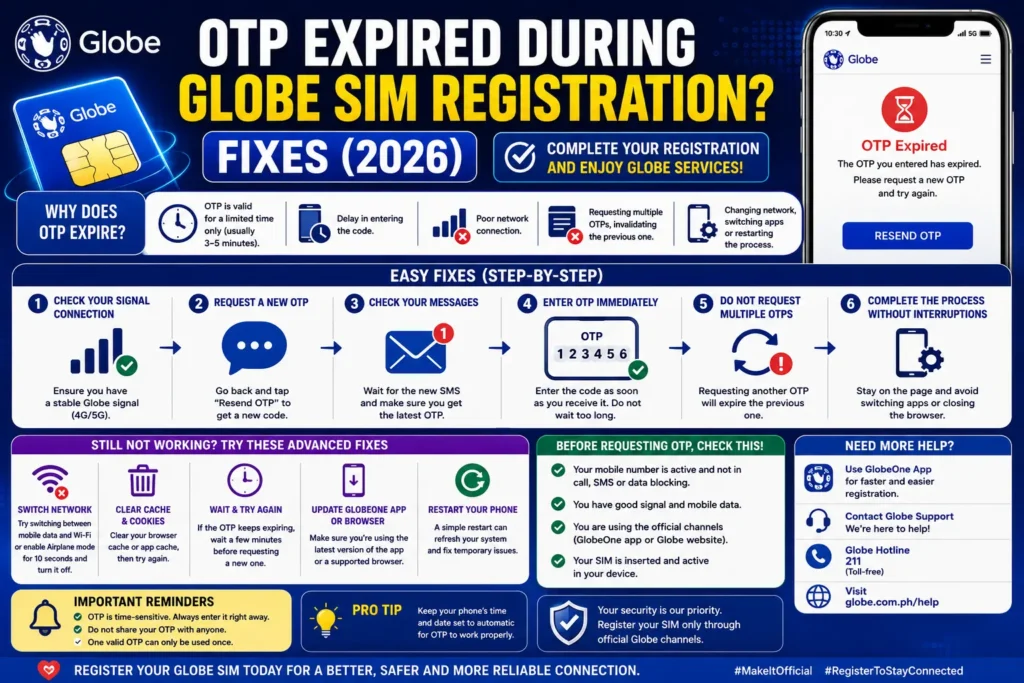
What is OTP and Why It’s Important
OTP stands for One‑Time Password — a special 6‑digit code sent to your phone to confirm that you are the owner of that SIM number. This is part of Globe’s SIM registration process to protect your account and stop fraud.
Most OTPs are only valid for a few minutes. Entering it after that means the code expires, and you’ll need a new one.
How Globe’s SIM Registration Works
Before diving into OTP issues, here’s the flow:
You start Globe SIM registration online or in the GlobeOne app.
You enter your mobile number.
Globe sends an OTP via SMS to that number.
You enter the OTP to verify your number.
You continue the rest of the registration (ID, selfie, personal info).
If the OTP expires, your registration stops at step 3.
Why OTP Expiry Happens (Common Causes)
Here are the things that make your OTP expire before you can use it:
Delayed SMS Delivery
Network traffic or a weak signal can slow down SMS delivery.
This means the code arrives late — sometimes after it has already expired.
Waiting Too Long to Enter It
If you take too long filling out other parts of the form before entering the OTP, it can expire.
Poor Network Signal
Weak mobile signal or switching between networks (like 4G to 3G) can delay OTP receipt.
Multiple Requests Too Fast
Requesting OTP repeatedly in a short time can trigger temporary delays or blocks.
How to Fix “OTP Expired” Quickly (Step‑by‑Step)
Here’s what actually works:
Wait for the OTP, Then Enter Right Away
As soon as the SMS comes in, type the code immediately.
Move to a Place with a Stronger Signal
Being outdoors or near a window helps your phone get SMS quickly.
Don’t Spam the Resend Button
Wait 1–2 minutes before requesting another OTP to avoid delays.
Use GlobeOne App
Some users find the app handles registration better than the browser.
Refresh or Restart
Close the page, refresh, or restart your phone if things still lag.
If OTP Still Doesn’t Work
If you tried the basics and still see expired codes:
Try a Different Browser
Some browsers delay form submissions.
Clear Browser Cache
Old data can interfere with form loading.
Register at a Different Time
Peak hours may slow Globe’s servers.
Ask for Help at a Globe Store
Staff can assist with registration on the spot.
Extra Tips to Avoid OTP Problems
Important Reminder: Deadlines Matter
The SIM Registration Act requires you to register all SIMs — Globe, TM, and Globe At Home — or your service could be restricted or deactivated. So finishing this step — even with OTP hiccups — is important. You can also read: Globe SIM Registered but Showing “Unregistered” Fix (2026)
FAQs
Final Words
Getting an expired OTP during Globe SIM registration is annoying — but it’s usually a temporary hurdle, not a roadblock. With the quick steps above, you can fix it and continue your registration smoothly.
Remember: a strong signal, entering OTP fast, and being patient go a long way. If the issue persists, the GlobeOne app or support team can help you finish registration so your SIM stays active and secure.


